Project — 03
Amethyst
A command-line tool that turns a Markdown file into a well-typeset PDF or Word document. One file in, one styled document out — no flags required, no stylesheet to write, no reference .docx to maintain. The point is output that looks deliberately set rather than printed from a browser.
$ uv tool install amethyst-cli
The package is amethyst-cli — the command it installs is amethyst
01 — One source, two documents
Written once, set twice
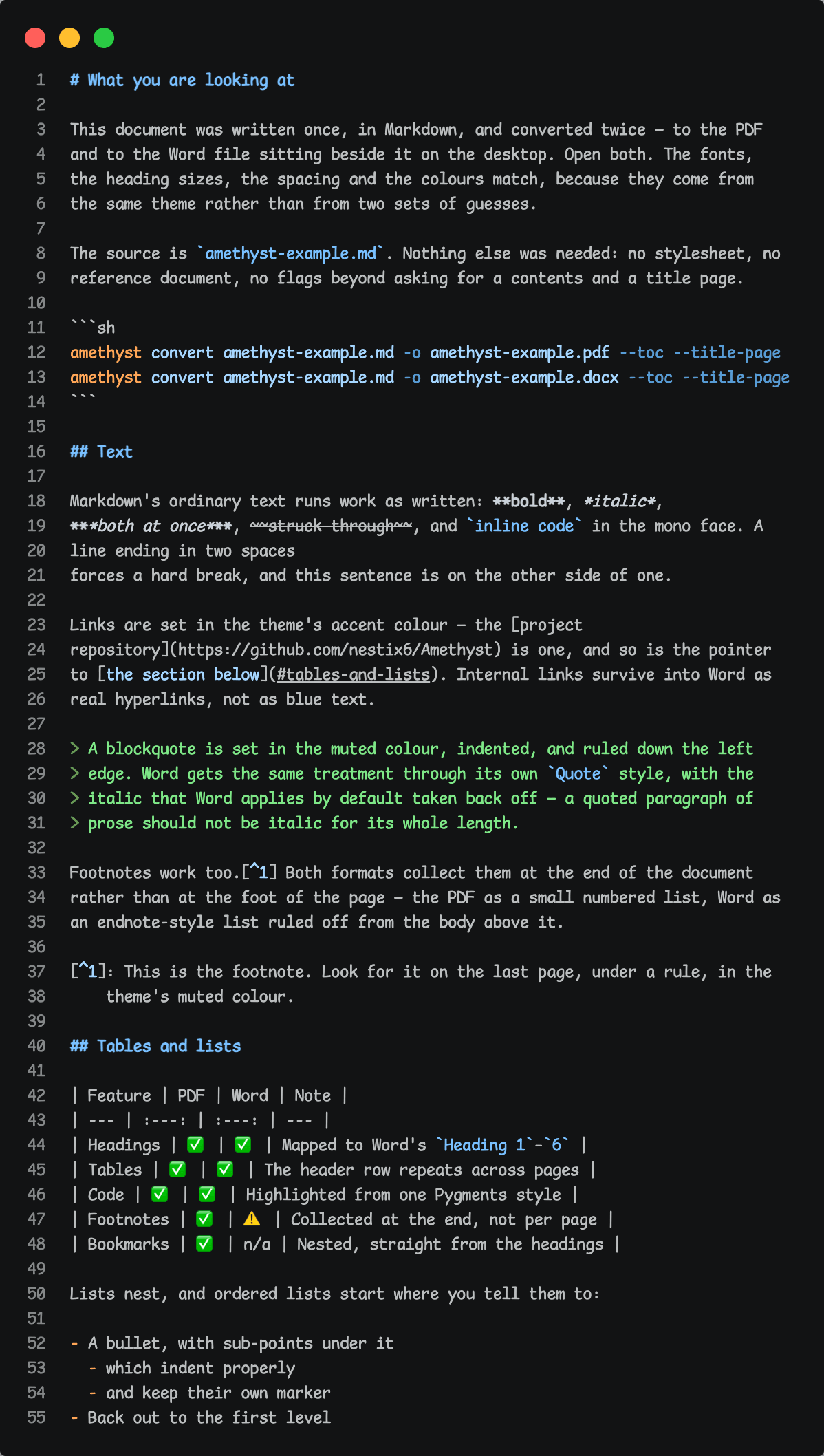
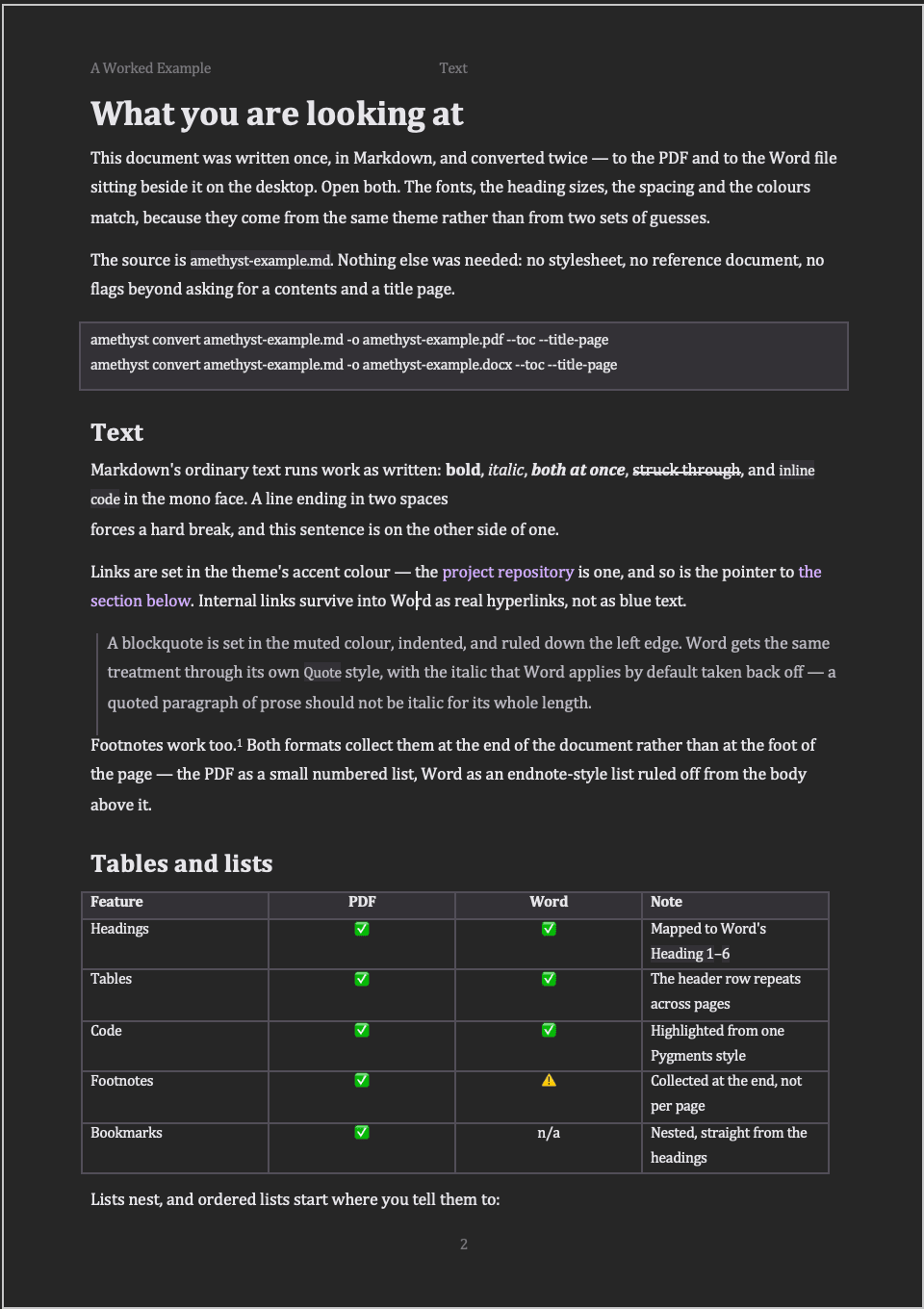
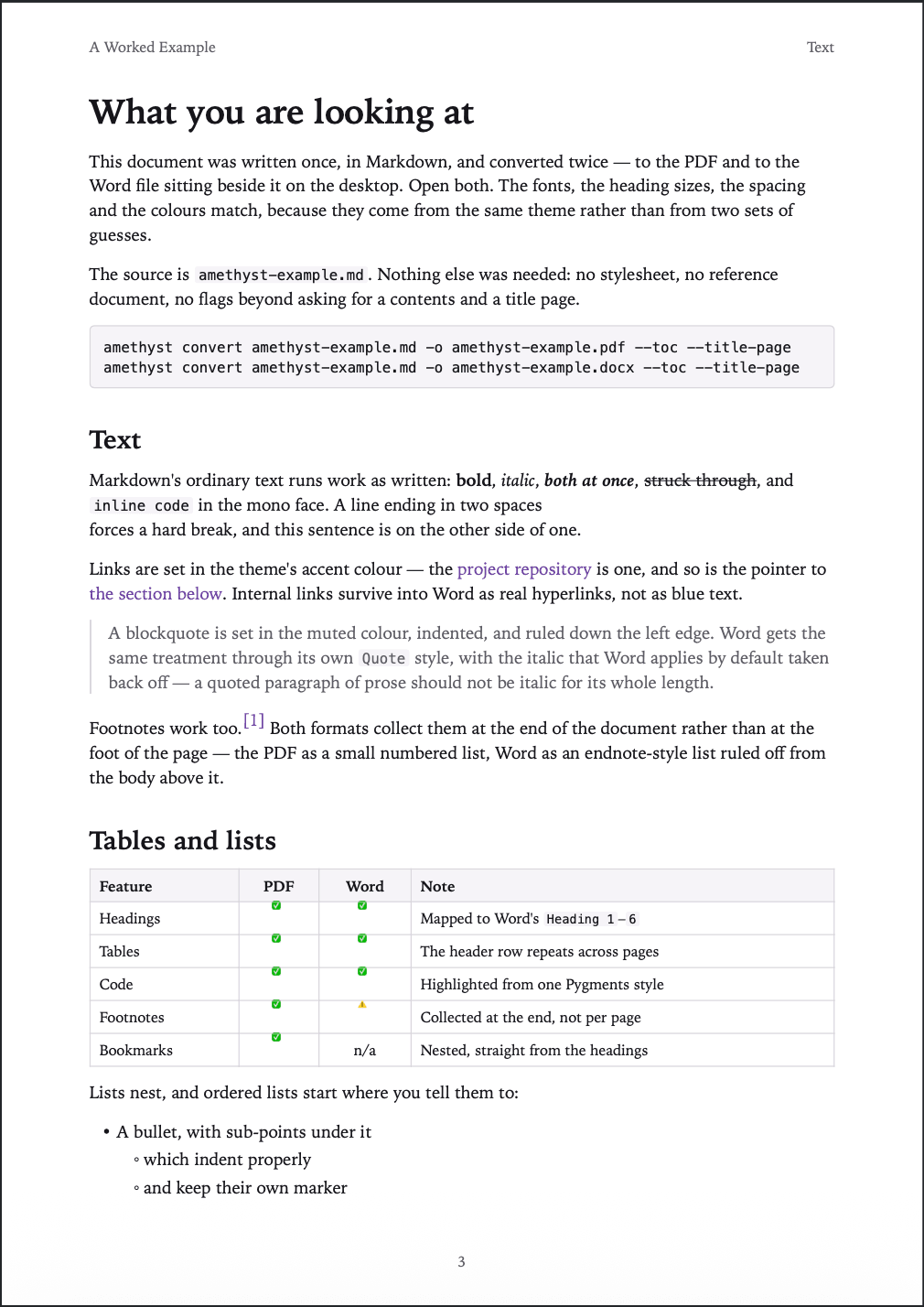
The file on the left is the whole input. The two documents beside it came out of it with one command each and nothing else — no stylesheet, no reference document, no flags beyond asking for a contents page and a cover. Open both and the fonts, the heading sizes, the spacing and the colours match, because they come from the same theme rather than from two sets of guesses.
$ amethyst convert amethyst-example.md -o amethyst-example.pdf --toc --title-page
$ amethyst convert amethyst-example.md -o amethyst-example.docx --toc --title-page
02 — How it holds together
One theme, compiled twice
Underneath, the two formats share almost nothing. A PDF has a mature HTML and CSS route, where paged media hands you margins, running heads, page numbers and outline bookmarks nearly for free. Word has no such route: its file is a flow of styled paragraphs and runs, so it needs a direct walk of the token stream. The Markdown is parsed once and rendered twice.
Parse once — frontmatter, Markdown tokens, resolved assets
PDF
tokens → HTML + CSS → WeasyPrint
Word
tokens → token walk → python-docx
The PDF path needs Pango, a system library — the one thing it cannot install for you. DOCX needs none of it.
The theme is the consistency mechanism, and it is the only one: one TOML file declaring fonts, a type scale, colours, spacing and page geometry, compiled to CSS custom properties on one side and to Word style definitions on the other. Sizes are multiples rather than lengths, so changing the body size rescales the whole document. Three themes ship, and anything a theme leaves out falls back to the default — which means a theme can be one line.
default
A serif face and a violet accent. What you get when you say nothing.
academic
A quiet book serif, a narrow measure, generous margins.
github
System sans, blue links, quiet rules.
Or start from one and change what you want
03 — Where they part ways
Honest about the edges
Nearly everything crosses into both formats intact — headings, nested and ordered lists, blockquotes, tables, links, local and remote images, highlighted code, footnotes, a contents page, a running head and a title page. Four things are approximate on purpose, and they are written down rather than discovered later.
Footnotes in Word
An endnote-style list at the end of the document, ruled off from the body, rather than real Word footnotes.
Task lists in Word
Printed ☐ and ☑ glyphs, not the clickable checkboxes Word makes elsewhere.
Raw HTML
Passes straight through to the PDF and is skipped in the DOCX, with one warning naming the line it was on.
Outline bookmarks
Nested straight from the headings in the PDF. Word has no equivalent, so it gets none.
LaTeX math and Mermaid diagrams are out of scope
04 — Closing
Tests cannot see a page
The suite converts a kitchen-sink document to both formats on every run, and it is offline by construction — a test that reaches the network fails rather than waiting on a socket. What it cannot check is whether a page actually looks right: extracted text and page counts say nothing about layout, and both rendering defects I found while building the PDF path had passed every assertion first. So the last step of the loop is still opening the file and looking at it. That turned out to be the useful lesson here — knowing exactly where the automated checks stop.